In This Guide
What Is a Stripboard?
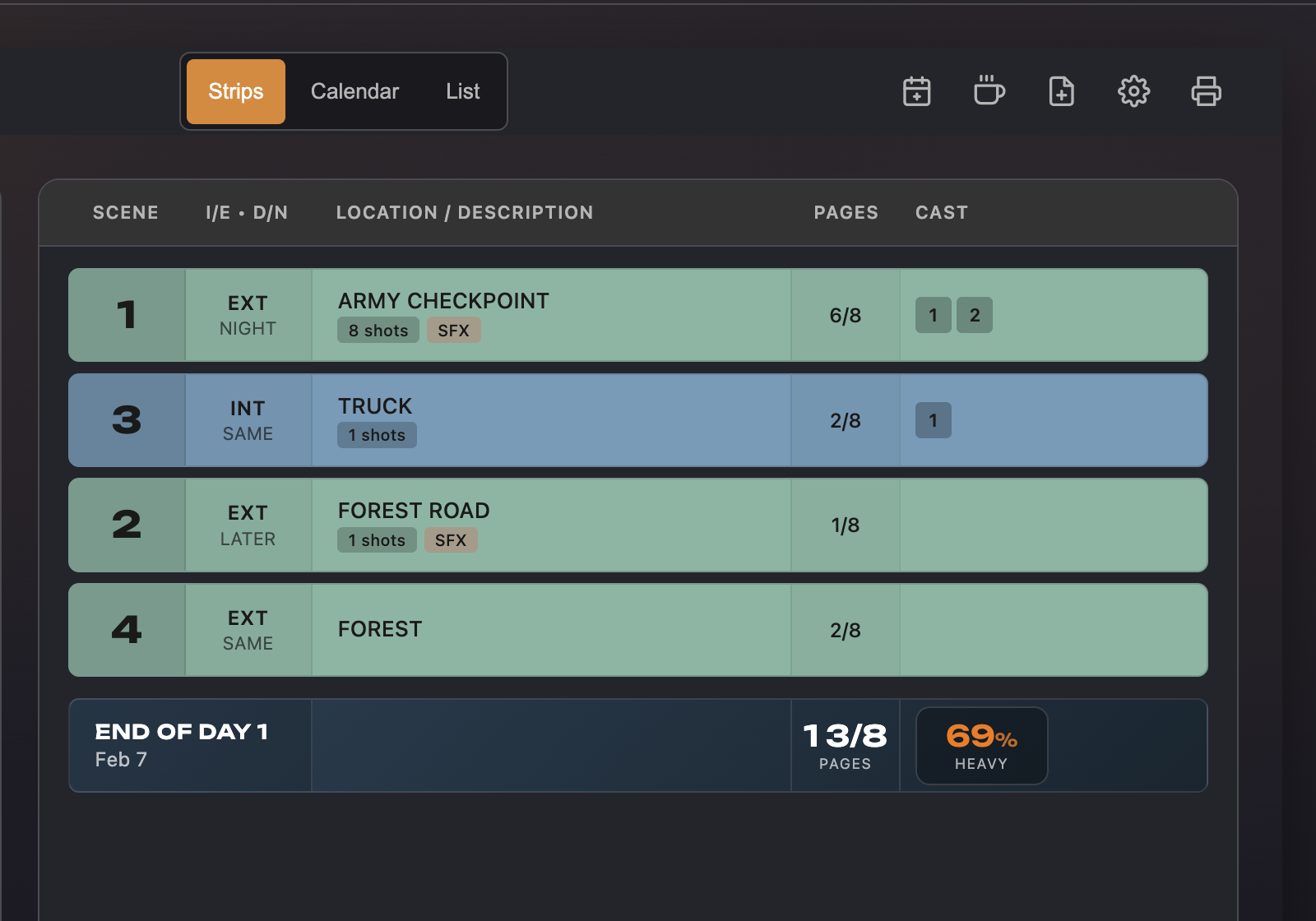
A stripboard is a scheduling tool where each scene in the script is represented by a horizontal strip — a single row containing the scene number, scene heading, page count, and cast members. The strips are arranged vertically in shooting order, with day breaks inserted between groups of scenes to divide the production into individual shoot days.
The format originated with physical production boards — large cardboard panels with thin cardboard strips that could be physically rearranged. Each strip was color-coded by INT/EXT and DAY/NIGHT using the Entertainment Partners standard: white for interior day, yellow for exterior day, green for interior night, blue for exterior night. The digital version works the same way — you drag strips up and down to reorder scenes and insert breaks to define days.
The stripboard is the single most important scheduling document on a production. It's what the 1st AD uses to plan each day, what the production manager uses to estimate costs, and what department heads reference to know when their resources are needed.
Before You Schedule
You can't build a useful schedule without two things: a complete script breakdown and a list of hard constraints.
The breakdown gives you the data: which cast members are in each scene, what the page count is, what special requirements exist (effects, vehicles, stunts, animals). Without this, you're guessing at how long scenes take and which days need which people.
The constraints are the non-negotiable realities of your production. Actor availability — your lead is only available for two weeks, your supporting actor can't work Tuesdays. Location access — the restaurant location is only available on weekends, the park requires a permit that's only valid on specific dates. Equipment rentals — the crane is booked for three days and costs money every day you have it. Weather and daylight — exterior day scenes need to be grouped to maximize shooting hours.
Write these constraints down before you start arranging strips. They'll drive most of your decisions.
Ordering Scenes
Scenes are almost never shot in script order. Shooting order is determined by practical efficiency, not narrative sequence. The goal is to minimize wasted time and money — which means grouping scenes intelligently.
Group by Location
This is the primary grouping strategy. Every time your production moves to a new location — a company move — you lose time to travel, load-in, and setup. Shoot all scenes at a given location consecutively before moving on. If scenes 3, 14, and 28 all take place in the same apartment, schedule them on the same day or consecutive days regardless of where they fall in the script.
Group by Cast
After location, cast availability is the biggest constraint. If an actor is only available for a specific window, group all their scenes within that window. Even without hard availability limits, it's often cheaper and more efficient to schedule an actor's scenes together rather than bringing them back multiple times.
INT/EXT and Time of Day
Exterior day scenes depend on sunlight. Group them together and schedule them when you have the most daylight hours. Interior scenes are more flexible — they can be shot regardless of weather or time of day if the location has controllable lighting. Exterior night scenes are particularly demanding on the crew and should be scheduled carefully.
Complexity and Energy
Don't front-load all your hardest scenes on day one, when the crew is still finding its rhythm. And don't stack every emotionally demanding scene on the same day — actors need recovery time between intense performances. Spread the difficulty across the schedule and try to end each day with something manageable rather than the most complex setup.
Tip: Start your schedule by placing the scenes with the hardest constraints first — the ones that can only be shot on specific days, at specific locations, or with specific actors. Everything else arranges around these anchors. Trying to optimize the easy scenes first and then fitting in the constrained ones last almost always fails.
Day Breaks and Meal Breaks
A day break on the stripboard marks where one shoot day ends and the next begins. Everything above the break is shot on one day; everything below it starts the next day. Placing day breaks is one of the most consequential scheduling decisions you'll make.
Each shoot day has a fixed amount of usable time — typically 10 to 12 hours for a professional production, often less for indie and student shoots. You need to fit all the scenes for that day within the available time, including setup, shooting, and transitions between scenes.
Meal breaks are required on professional sets — typically after six hours of work. Even on an indie production where union rules don't apply, feeding your crew on time is essential for morale and energy. Plan meal breaks into the schedule rather than treating them as an afterthought.
When placing day breaks, watch for cast implications. If an actor appears in the last scene of one day and the first scene of the next, they need to have adequate turnaround time — the hours between wrap and their next call. Union productions mandate a minimum turnaround (usually 10–12 hours). Even on non-union shoots, calling an actor back at 6 AM after they wrapped at midnight is a recipe for a bad day.
Page Counts and Time Estimation
Scene length in film production is measured in eighths of a page. A half-page scene is 4/8. A three-quarter-page scene is 6/8. This measurement system exists because eighth-page increments are specific enough to be useful for scheduling but not so granular that they imply false precision.
Page count is the starting point for estimating how long a scene takes to shoot. A very rough rule of thumb is that a well-prepared production can shoot about five pages per day on a standard 12-hour schedule. But this varies enormously based on complexity — a five-page dialogue scene in one location might shoot faster than a half-page action sequence with stunts and special effects.
The better approach is to estimate per scene based on the number of setups (from your shot list), the complexity of those setups, and the elements involved (from your breakdown). A scene with two camera setups, two actors, and no special requirements might take an hour. A scene with six setups, a vehicle, and rain effects might take four hours. Total the estimates for each day and make sure they fit within your available hours.
Balancing the Schedule
An unbalanced schedule is one where some days are overloaded and others are light. This is the most common scheduling mistake, and it creates cascading problems: an overloaded day falls behind, which pushes scenes to the next day, which overloads that day, and so on until the whole schedule collapses.
The solution is to actively balance the load across days. Look at each day's total page count, number of setups, and complexity. If one day has 8 pages with special effects and the next has 2 pages of simple dialogue, something is wrong — move scenes around to distribute the workload more evenly.
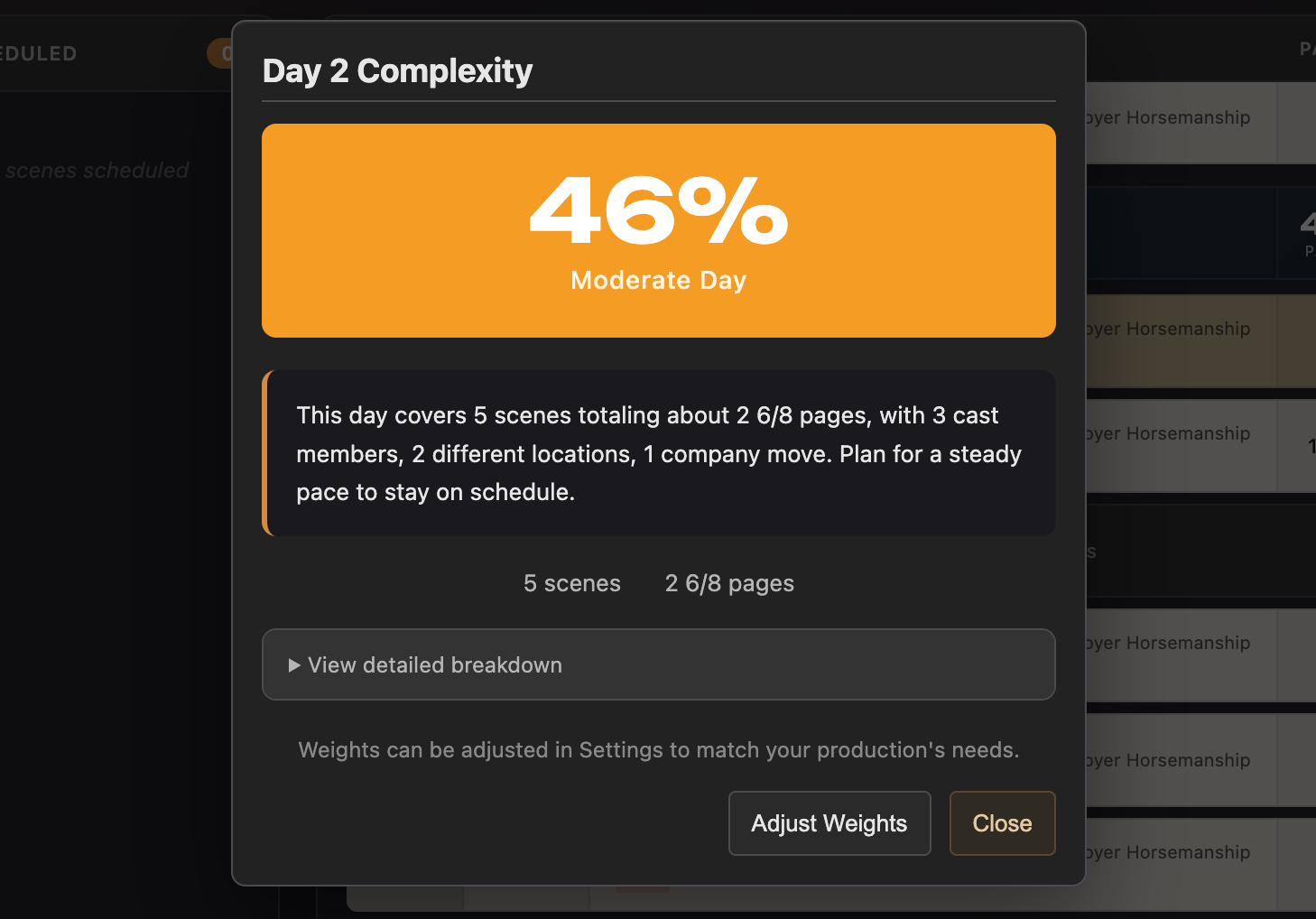
Some tools calculate a daily complexity score that factors in page count, number of cast members, special requirements, and setup count. This gives you a quick read on how demanding each day is relative to the others. You don't need every day to be identical, but the spread shouldn't be extreme.
Also watch for crew fatigue patterns. The hardest days should be early in the week, not at the end. And if you have a particularly grueling day — a night shoot, a large crowd scene, a complex stunt — try to follow it with something lighter to let the crew recover.
Day Out of Days
A Day Out of Days (DOOD) report is a chart that shows each cast member's status on each shoot day: working, on hold, on start, on finish, or on a travel day. It's generated from the schedule and the breakdown data — the schedule determines which scenes are shot on which days, and the breakdown determines which cast members are in each scene.
The DOOD serves several purposes. For the production manager, it shows the total number of work days and hold days for each cast member, which directly affects budget (actors are typically paid for work days and sometimes for hold days). For the 1st AD, it reveals scheduling problems — if an actor has a single scene on day 5 but is otherwise wrapped on day 3, it might be worth rearranging the schedule to avoid bringing them back for one scene.
For indie productions, the DOOD is most useful as a communication tool. It tells each actor exactly which days they need to be available, which helps them plan around other commitments. It's also a quick way to verify that your schedule respects everyone's availability constraints.
From Schedule to Call Sheet
Once the schedule is locked — or at least stable for the next shooting day — it feeds directly into the call sheet. The call sheet takes the day's scenes from the schedule, the cast and element requirements from the breakdown, and the crew contact information from your production records, and assembles them into a single document that tells everyone where to be, when to be there, and what to bring.
The schedule determines the call sheet's scene order, call times, and estimated wrap time. The breakdown provides the props, wardrobe, and special requirements for each scene. The production details — location addresses, parking instructions, weather, nearest hospital — are added by the production coordinator or AD.
In a connected workflow, generating a call sheet from a locked schedule day is a matter of clicking a button rather than copying data between documents. The data is already there — you entered it during the breakdown and organized it during scheduling. The call sheet is the final output of the entire pre-production pipeline.